
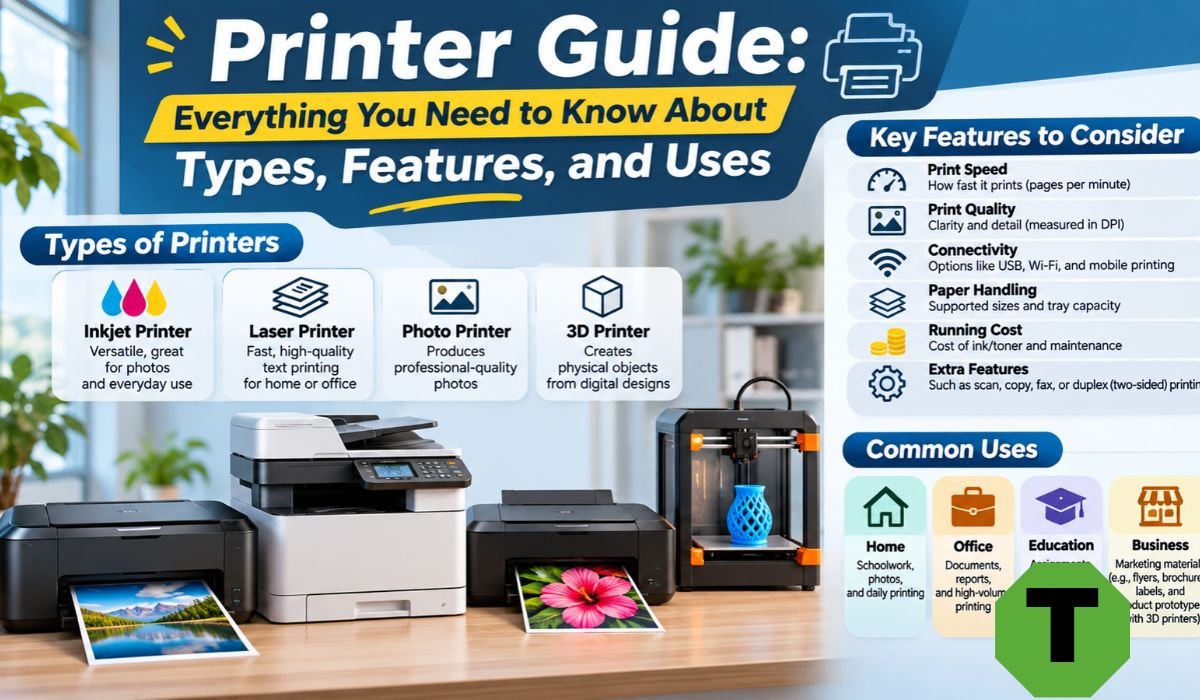
A Printer is one of the most useful devices in modern life. From printing school assignments and business documents to creating photographs and shipping labels, printers help turn digital information into something we can physically hold, read, and share.
In 2026, Printing Technology goes far beyond simply putting ink on paper. Modern Printers support Wireless Printing, mobile connectivity, automatic double-sided printing, and advanced document management. Some specialized machines can even create three-dimensional objects. Whether you’re a student, photographer, business owner, or everyday computer user, understanding Printer Types, Features, Uses, and operating costs can help you choose a device that meets your needs.
Quick Information About Printers
| Information | Details |
|---|---|
| Device Name | Printer |
| Device Classification | Output Device |
| Primary Function | Producing Physical Output |
| Early Computer Printing Pioneer | Charles Babbage |
| HP LaserJet Introduction | 1984 |
| HP DeskJet Introduction | 1988 |
| Common Types | Inkjet, Laser, Thermal, and Dot Matrix |
| Printing Materials | Paper, Labels, Cards, and Other Media |
| Printing Supplies | Ink, Toner, and Ribbons |
| Printing Speed | Pages Per Minute (PPM) |
| Print Resolution | Dots Per Inch (DPI) |
| Connectivity | USB, Wi-Fi, and Ethernet |
| Double-Sided Printing | Duplex Printing |
| Multifunction Features | Printing, Scanning, and Copying |
| Advanced Technology | 3D Printing |
| Mobile Printing | Supported by Compatible Models |
| Common Applications | Homes, Schools, Offices, and Industries |
| Maintenance | Cleaning, Updates, and Supply Replacement |
What Is a Printer?
A Printer is a computer peripheral that produces physical output from electronic information. It receives documents, photographs, graphics, or other data from a connected device and reproduces them on paper or another suitable material. A conventional Printer is classified as an Output Device because it presents information rather than collecting it. However, a Multifunction Printer also provides input capabilities through its built-in scanner. Printers are widely used for education, business communication, recordkeeping, and creative activities. Virtual Printers work differently because they create digital files, such as PDFs, instead of physical documents.
History of Printers
The development of computer printing can be traced back to the nineteenth century, when Charles Babbage designed mechanical computing machines with printing mechanisms. His complete Difference Engine No. 2 was eventually constructed in London by 2002. Commercial Printing Technology advanced significantly during the twentieth century. Epson’s compact EP-101 became an important digital printing milestone, while HP introduced its LaserJet in 1984 and DeskJet in 1988. These innovations made printing increasingly accessible to businesses and households. Later developments introduced Wireless Printing, multifunction devices, refillable ink systems, and sophisticated industrial printing equipment.
Computer History Museum+2
How Does a Printer Work?
The printing process begins when a user sends a Print Command from a computer, smartphone, or tablet. The operating system and compatible printing software prepare the document and communicate instructions to the Printer. Internal rollers move the paper through the machine while the printing mechanism reproduces the requested content. Inkjet Printers release tiny droplets of liquid ink, whereas Laser Printers use an electrical charge, an imaging drum, powdered toner, and heat. Thermal Printers create markings using heat-sensitive materials or ribbons. Although these technologies operate differently, their basic purpose is to convert electronic information into readable physical output.
Main Parts of a Printer
Every Printer contains several components that work together to produce accurate results. An Ink Cartridge or refillable Ink Tank stores liquid ink, while a Toner Cartridge supplies powdered printing material. The Printhead controls ink placement in Inkjet Printers, and Paper Feed Rollers guide sheets through the machine. Laser Printers typically contain an Imaging Drum and a Fuser Unit, which helps bond toner to the paper. Other important elements include paper trays, sensors, control panels, internal memory, and Printer Firmware. Understanding these components makes routine maintenance and basic troubleshooting considerably easier.
Different Types of Printers
Several Types of Printers are available, each designed for particular tasks. Inkjet Printers are popular for photographs, school projects, and colorful documents. Laser Printers are particularly effective for sharp text and higher-volume document printing. Ink Tank Printers use refillable reservoirs that can reduce ongoing ink expenses. Dot Matrix Printers strike an inked ribbon with small pins, making them useful for certain multipart forms. Direct Thermal Printers use heat-sensitive media, while Thermal Transfer Printers use heated ribbons. Multifunction Printers combine several office tasks within one device, including printing, scanning, copying, and sometimes faxing.
Specialized Printers and 3D Printing
Specialized Printers handle applications that conventional devices may not perform efficiently. Photo Printers produce detailed photographs, while Barcode Printers support stock management and shipping operations. Card Printers create identification and membership cards, and Large-Format Printers produce posters, banners, and architectural drawings. A 3D Printer operates differently by creating solid objects from digital models through Additive Manufacturing. Depending on the technology, these machines use materials such as plastic, resin, or metal. Their applications include engineering, industrial production, education, product development, and customized manufacturing.
Inkjet vs. Laser Printers
Choosing between an Inkjet Printer and a Laser Printer depends largely on your printing habits. Inkjet models are generally suitable for photographs and detailed color graphics, while Laser Printers are often preferred for producing large quantities of text documents. Traditional cartridge-based Inkjet Printers may have affordable purchase prices, but frequent cartridge replacements can increase operating expenses. Laser Printers may cost more initially, although certain models offer economical high-volume printing. Refillable Ink Tank Printers provide another option for frequent color printing. Comparing actual supply costs, cartridge yields, and recommended workloads is more reliable than assuming one technology is always cheaper.
Common Uses of Printers
Printers support a wide variety of personal and professional activities. Students use them to produce assignments, worksheets, and study materials, while businesses rely on them for contracts, invoices, reports, and presentations. Retailers print receipts and price labels, logistics companies create shipping labels, and healthcare facilities produce identification labels and administrative documents. Photographers use specialized machines to preserve images, while architects rely on Large-Format Printing for technical drawings. Despite the popularity of digital communication, printed materials remain valuable whenever information needs to be physically displayed, signed, reviewed, or stored.
Important Printer Features
Understanding Printer Features helps buyers compare different models effectively. Printing Speed is measured in Pages Per Minute (PPM), while Print Resolution is commonly expressed in Dots Per Inch (DPI). Automatic Duplex Printing allows documents to be printed on both sides of a sheet. An Automatic Document Feeder (ADF) simplifies scanning and copying multiple pages. Other useful features include paper capacity, cartridge yield, borderless printing, touchscreen controls, and supported paper sizes. Remember that higher specifications do not automatically guarantee better performance, particularly when paper quality and printing technology also influence the results.
Printer Connectivity Options
Modern Printers offer several convenient connectivity options. USB provides a direct wired connection, while Ethernet allows multiple users to share a Printer across an office network. Wi-Fi makes Wireless Printing possible from compatible computers and mobile devices, and Wi-Fi Direct can establish a connection without a conventional router. Apple AirPrint and Mopria technology simplify printing from compatible mobile devices. In 2026, Printer Security is equally important. Users should protect administrative settings, install Firmware Updates, and avoid exposing network-connected printers unnecessarily to the public internet.
Advantages and Disadvantages of Printers
The biggest advantage of a Printer is its ability to provide convenient access to physical information. Printed documents are useful for education, professional communication, recordkeeping, and creative projects. However, owning a Printer also involves expenses related to paper, ink, toner, electricity, and maintenance. Some devices develop paper jams or connectivity issues, while excessive printing contributes to environmental waste. The most effective approach is to balance the convenience of physical documents with Digital Document Management and print only when a physical copy offers meaningful value.
How to Choose the Right Printer
Choosing the right Printer starts with understanding what you need to print and how frequently you use the device. A Monochrome Laser Printer may suit someone who regularly prints black-and-white documents, while an Inkjet Printer can be useful for family photographs and school projects. Businesses with frequent color printing requirements may benefit from an Ink Tank Printer. Buyers should also consider printing speed, paper capacity, warranty coverage, wireless compatibility, and replacement supply availability. Check whether specific features require an online account or subscription before making a purchase.
Understanding Printer Costs
The purchase price is only one part of the overall cost of owning a Printer. Replacement supplies, maintenance, paper, and electricity can significantly influence long-term expenses. To estimate the ink or toner cost per page, divide the supply price by its advertised page yield. For example, a $40 cartridge rated for 2,000 pages has an estimated supply cost of two cents per page. Actual costs may differ because of printing frequency, page coverage, and maintenance cycles. Comparing Total Cost of Ownership provides a clearer picture of long-term affordability.
Printer Problems and Maintenance
Paper Jams, faded documents, offline messages, and slow printing are common Printer Problems. Checking cables, restarting the device, reviewing network settings, and updating compatible Printer Drivers can resolve many connectivity issues. Poor print quality may indicate low ink, insufficient toner, or a dirty Printhead. Regular maintenance includes keeping paper dry, avoiding overloaded trays, and following manufacturer-recommended cleaning procedures. Unnecessary printhead cleaning can waste ink, so perform it only when needed. Always follow the manufacturer’s instructions before handling internal components or attempting repairs.
Environmental Impact and Future Technology
Sustainability is an important consideration in modern Printing Technology. Automatic Duplex Printing reduces paper use, while energy-saving settings help limit electricity consumption. Recycling empty cartridges and responsibly disposing of electronic equipment can also reduce waste. ENERGY STAR-certified imaging equipment provides a useful starting point when comparing energy-efficient devices. Looking ahead, better automation, connected printing systems, improved security, and advances in 3D Printing are likely to influence how individuals and businesses use printers. These developments could make printing more efficient and adaptable to changing requirements.
Final Thoughts
A Printer remains a valuable device in an increasingly digital world. From everyday document printing to professional photography and advanced industrial manufacturing, different printing technologies serve different purposes.
Understanding Printer Types, Features, operating costs, and maintenance requirements makes it easier to choose a reliable machine. Ultimately, the best Printer is not necessarily the most expensive or advanced model. It’s the one that meets your actual needs while balancing quality, convenience, affordability, and environmental responsibility.
FAQs About Printers
What Is a Printer?
A Printer is an electronic device that converts digital information into physical output. It can produce documents, photographs, labels, graphics, and other materials on compatible printing surfaces.
Is a Printer an Input or Output Device?
A conventional Printer is an Output Device because it receives digital information and produces physical results. A Multifunction Printer also provides input capabilities through its built-in scanner.
What Are the Main Types of Printers?
The main types include Inkjet, Laser, Thermal, Dot Matrix, and 3D Printers. Specialized categories also include Photo Printers, Barcode Printers, and Large-Format Printers.
Which Printer Is Best for Home Use?
An Inkjet Printer is often suitable for photographs and mixed household printing. A Monochrome Laser Printer may be more practical for text-heavy documents, while an Ink Tank Printer is worth considering for frequent color printing.
Can a Printer Work Without a Computer?
Yes. Many modern Printers support direct printing from smartphones, tablets, or compatible storage devices. Multifunction models can also make photocopies without a computer.
What Does DPI Mean in Printing?
DPI stands for Dots Per Inch. It measures printing resolution and helps describe how finely a Printer can reproduce images, text, and graphics. Paper quality and printing technology also affect the final result.
What Is the Difference Between Ink and Toner?
Ink is a liquid printing material used in Inkjet Printers. Toner is a fine powder used in Laser Printers that is typically bonded to paper using heat and pressure.
How Can I Reduce Printer Costs?
Use double-sided printing, compare replacement supply costs, choose suitable print quality settings, and perform recommended maintenance. Avoid unnecessary printing and use digital documents whenever practical.
[…] Learn more and explore exciting content on: Printer Guide: Everything You Need to Know About Types, Features, and Uses […]